
External Access
Use this guide to expose your application to clients outside the Workload Cluster, including clients on a private network. For Pod-to-Pod communication, Services and NetworkPolicies, see In-Cluster Networking. For Environments using Cilium, see Cilium Egress Gateway.
Ingress
Your End Users should never ever access the private network directly. Instead external access is enabled by creating Ingress objects. Welkin already comes with cert-manager and is already configured with a ClusterIssuer. Cert-manager automates certificate issuance and renewal through the configured certificate authority. The examples below use a Let's Encrypt ClusterIssuer; use the issuer provided by your Platform Administrator for your Environment. Welkin uses Traefik as Ingress Controller.
Assuming you configured a Service and a Deployment for your application, making End Users access your application involves two steps:
- Create the right DNS CNAME record.
- Create the right Ingress resource.
Running Example
Let us assume you want to host your application behind the nicely branded domain demo.example.com.
Proceed as follows:
For step 1, create a DNS CNAME as follows:
demo.example.com. 900 CNAME app.traefik.$DOMAIN.
where $DOMAIN is the environment-specific variable you received from the Platform Administrator.
The line above is presented in DNS Zone file format and is widely accepted by DNS providers.
After configuration, make sure the DNS record is properly configured and propagated, by typing:
host -a demo.example.com.
Important
In the above examples, the domain name is fully qualified, i.e., it ends with a dot.
Make sure your DNS provider does not mis-interpret it as a relative domain name.
Otherwise, you risk creating a DNS record like demo.example.com.example.com which is rarely what you want.
Important
Be cautious when using CNAME records and apex domains (e.g., example.com).
See here for a long discussion of potential problems and current workarounds.
For step 2, create an Ingress object with the right metadata.annotations and spec.tls, as exemplified below:
apiVersion: networking.k8s.io/v1
kind: Ingress
metadata:
  name: myapp-welkin-user-demo
  annotations:
    # To list your current ClusterIssuers, simply use 'kubectl get ClusterIssuers'.
    cert-manager.io/cluster-issuer: letsencrypt-prod-traefik

    ## Uncomment below line to enable allowlist and ratelimit middlewares.
    ## See next section on how to create the middlewares.
    # traefik.ingress.kubernetes.io/router.middlewares: <namespace>-demo-allowlist@kubernetescrd, <namespace>-demo-ratelimit@kubernetescrd

spec:
  ingressClassName: traefik
  rules:
    - host: "demo.example.com"
      http:
        paths:
          - path: /
            pathType: Prefix
            backend:
              service:
                name: myapp-welkin-user-demo
                port:
                  number: 3000
  tls:
    - hosts:
        - "demo.example.com"
      secretName: demo.example.com-tls
Tip
Feel free to take inspiration from the user demo.
If you want to protect your Ingress with OAuth2-based authentication, check out oauth2-proxy.
Important
The DNS name in spec.rules[0].host and spec.tls[0].hosts[0] must be the same as the DNS entry used by your End Users, in the example above demo.example.com.
Otherwise, the End Users will get a "Your connection is not private" error.
Important
Source IP preservation depends on the cloud or Infrastructure Provider and its load-balancer configuration. Some load-balancers fronting Welkin do not preserve source IP. This makes source IP allowlisting unusable.
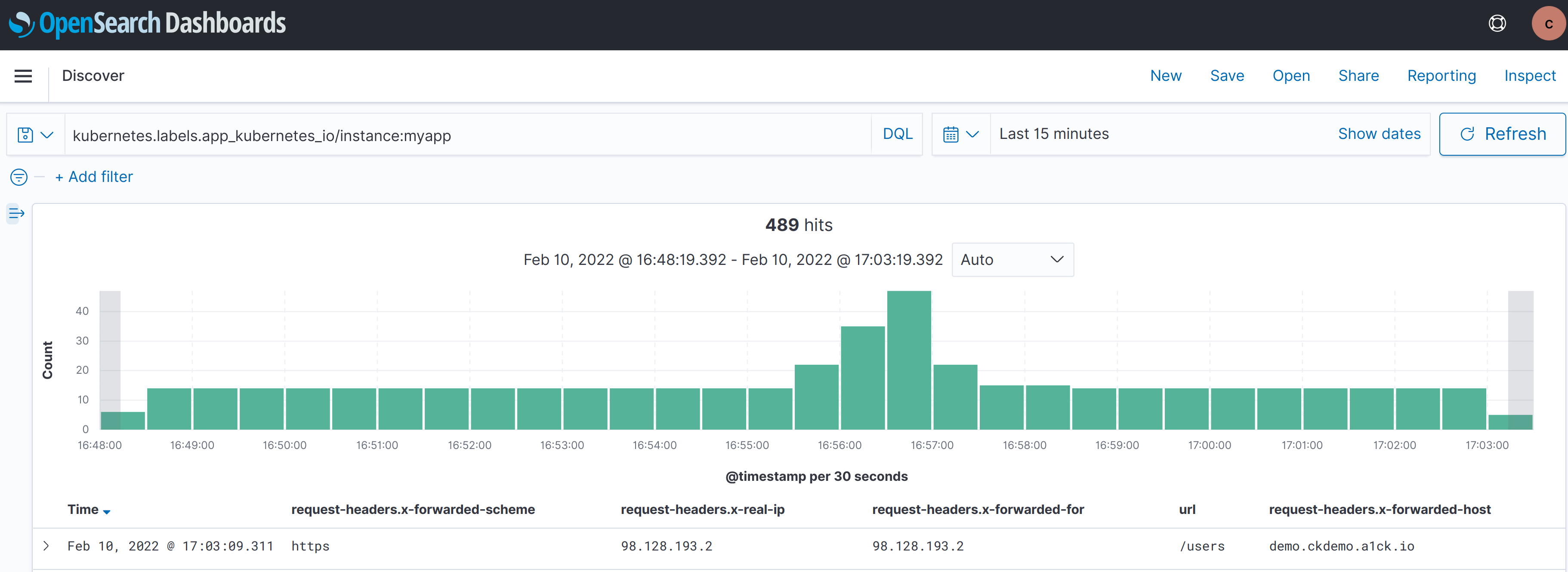
To check if source IP is preserved, check the HTTP request headers received by your application, specifically x-forwarded-for and x-real-ip.
The user demo logs all HTTP request headers, as shown in the screenshot below.
Rate limiting, allowlisting, and other functionality
To enable additional functionality on your Ingress objects, you can create Traefik Middlewares.
Middlewares allow you to add features such as rate limiting, allowlisting, and other functionality without changing your application.
# Blocklisted IPs will get HTTP 403.
apiVersion: traefik.io/v1alpha1
kind: Middleware
metadata:
  name: demo-allowlist
  namespace: <namespace>
spec:
  ipAllowList:
    sourceRange:
      - 192.0.2.2/32
---
# The rate is defined by dividing average by period.
# Example allows average 100 requests per second with short bursts of up to 200 requests if needed.
apiVersion: traefik.io/v1alpha1
kind: Middleware
metadata:
  name: demo-ratelimit
  namespace: <namespace>
spec:
  rateLimit:
    average: 100
    period: 1s
    burst: 200
Once the Middlewares are created, return to the full Ingress example.
Remove the leading # from the traefik.ingress.kubernetes.io/router.middlewares line under metadata.annotations and replace <namespace> with the namespace containing your Middlewares.
See the Traefik HTTP Middleware Documentation and the Traefik TCP Middleware Documentation for more examples and details.
Internal Load Balancer
Note
This is currently only supported on AWS, Azure, Elastx and UpCloud.
You can request an additional Load Balancer specifically for internal traffic by filing a service ticket to the Platform Administrator. This is useful for separating internal traffic and external traffic and to protect the internal customers in case of a DDoS attack against the external Load Balancer.
Warning
There is a security concern if PROXY protocol is enabled on the Ingress Controller that can lead to an attacker being able to reach the internal endpoints from the public network. To avoid this, use an IPAllowList Traefik Middleware annotation on the internal Ingresses and only allow the private network. This is not a concern if PROXY protocol is disabled. If you are unsure whether PROXY protocol is enabled or not, ask the Platform Administrator.
Once the Load Balancer is set up, a wildcard DNS record that points towards the internal Load Balancer will be provided.
*.internal.$DOMAIN where $DOMAIN is the environment-specific variable you received from the Platform Administrator.
It is recommended that you create a CNAME record that points towards the provided DNS record.
Automated Certificate Management
Welkin uses cert-manager to automate TLS certificate issuance and renewal and store certificates in Kubernetes Secrets. An Issuer or ClusterIssuer connects cert-manager to a certificate authority. Cert-manager supports different issuer types, including ACME services such as Let's Encrypt, private certificate authorities and Vault.
Let's Encrypt is one supported public certificate authority, and the examples below use the letsencrypt-prod-traefik ClusterIssuer.
Ask your Platform Administrator which issuer to use in your Environment.
Replace the issuer name in the examples when using a different ClusterIssuer.
In air-gapped Environments, cert-manager can use an internal certificate authority or an internal ACME service instead of a public service. The Platform Administrator configures the issuer and the required trust distribution so clients trust the issued certificates. See air-gapped certificate provisioning and custom root of trust for administrator guidance.
Issuing a Certificate
For an Ingress, configure the issuer annotation and spec.tls as shown below or in the running example.
Cert-manager automatically creates the Certificate resource and stores the issued certificate in the Secret named by spec.tls[].secretName.
You do not need to create a Certificate resource or the TLS Secret first.
apiVersion: networking.k8s.io/v1
kind: Ingress
metadata:
  annotations:
    cert-manager.io/cluster-issuer: letsencrypt-prod-traefik # (1)
  name: webapp-ingress
  namespace: default # (2)
spec:
  rules:
    - host: example.com
      http:
        paths:
          - pathType: Prefix
            path: /
            backend:
              service:
                name: myservice
                port:
                  number: 80
  tls: # (3)
    - hosts:
        - example.com
      secretName: webapp-certificate # (4)
- Annotation indicating the issuer to use.
- Target namespace where the object will be created.
- Placing a host in the TLS configuration will determine what ends up in the cert’s subjectAltNames.
- The created certificate is stored in this secret.
Managing a Certificate Directly
Create a Certificate resource directly when you need a TLS Secret for a workload that is not exposed through an Ingress, or need to manage the certificate independently of an Ingress. This is optional and is not a prerequisite for the Ingress examples.
apiVersion: cert-manager.io/v1
kind: Certificate
metadata:
  name: custom-cert
spec:
  dnsNames: # (1)
    - "domain.example.com"
  issuerRef: # (2)
    kind: ClusterIssuer
    name: letsencrypt-prod-traefik
  secretName: custom-cert # (3)
- For which domains the certificate will be valid for.
- Reference to the issuer to use.
- The created certificate is stored in this secret.
Important
You can monitor your own certificates using the User Alertmanager instance. Read more in our documentation about Alerts.
Let's Encrypt Environments
Let's Encrypt provides two environments as part of their ACME V2 standardization: Staging & Production.
For Traefik, Welkin's provided ClusterIssuers are letsencrypt-staging-traefik for staging and letsencrypt-prod-traefik for production.
Use the corresponding name in the cert-manager.io/cluster-issuer annotation or a Certificate's spec.issuerRef.name.
These names are also documented in the Traefik migration guide.
Run kubectl get clusterissuers to check which issuers are available in your Environment.
The ACME URL for Let's Encrypt ACME v2 staging environment is: https://acme-staging-v02.api.letsencrypt.org/directory
The ACME URL for Let's Encrypt ACME v2 production environment is: https://acme-v02.api.letsencrypt.org/directory
The production environment issues publicly trusted certificates. The staging environment issues test certificates signed by authorities that browsers do not trust by default.
We highly recommend testing against the Let’s Encrypt staging environment and use it for any non-production workloads. This will allow you to get things right before issuing trusted certificates and reduce the chance of you running up against rate limits. Use staging to verify that certificate requests and ACME challenges work before requesting production certificates.
Important
Certificates issued by the Let's Encrypt staging environment are signed by untrusted authorities, similar to self-signed certificates. They are typically not used in production environments.
Note
DNS-01 challenges require credentials for the DNS provider and connectivity from cert-manager to the provider's API and DNS servers. Welkin's cert-manager egress decision allows DNS and HTTP egress to support certificate challenges. If your DNS provider requires connectivity that your Environment does not allow, contact your Platform Administrator.
Let's Encrypt Rate Limits
Let's Encrypt provides rate-limits on generated certificates to ensure fair usage across all clients. The production environment limits can be exceeded more frequently in environments where certificates are installed or reinstalled frequently. This can result in failed installations due to rate limit exceptions on certificate generation.
In such environments, it is better to use the Let's Encrypt staging environment, which has much higher limits than the production environment.
The default rate limits for the production environment are listed in the following page by Let's Encrypt: Production Rate Limits.
The staging environment uses the same rate limits as described for the production environment with some exceptions that are listed here : Staging Rate Limits.
Demarcation of Responsibilities
As an Application Developer, you are responsible for creating the application's Services and Ingresses, configuring external DNS, and configuring TLS and any required Middlewares. The user demo shows an example.
The Platform Administrator is responsible for configuring the Ingress Controller, cert-manager and ClusterIssuers, and arranging any additional internal Load Balancer.